There are a lot of free web hosting options available now, and some of them are surprisingly good. If you are building a personal website, portfolio, small business site, class project, or even a small web application, you may not need to pay anything for hosting.
I spent some time looking at the options I think are the most useful right now: Netlify, Cloudflare Pages, Vercel, GitHub Pages, and Render. I also included a note about ChatGPT Sites and Codex because AI is quickly becoming part of the development and hosting process.
One nice thing they have in common is that all of the main hosting options below allow you to connect your own custom domain (or purchase one for a fee), so you aren't stuck using something like mywebsite.netlify.app. (Netlify)
Quick Comparison
| Service | Best For | Free Usage | Node.js | Setup |
|---|---|---|---|---|
| Netlify | Best overall | 300 credits/month | ✅ Serverless | ⭐⭐⭐⭐⭐ |
| Cloudflare Pages | Static sites | Unlimited static requests/bandwidth | ⚠️ Node-compatible functions | ⭐⭐⭐⭐⭐ |
| Vercel | Next.js / React | 100 GB + 1M requests/month | ✅ Serverless | ⭐⭐⭐⭐⭐ |
| GitHub Pages | Simple sites / portfolios | 100 GB/month | ❌ | ⭐⭐⭐⭐ |
| Render | Node.js / Express | 750 server hours + 5 GB bandwidth | ✅ Full Node server | ⭐⭐⭐⭐ |
My quick picks
-
Best overall: Netlify
-
Best free static hosting: Cloudflare Pages
-
Best for Next.js: Vercel
-
Best for a simple portfolio or project: GitHub Pages
-
Best for a traditional Node.js app: Render
Netlify: My Best Overall Pick
After spending some time playing around with Netlify, this is probably the service I would recommend first to someone who just wants to get a website online without making things complicated.
If you have a simple HTML, CSS, and JavaScript project, you can literally drag your project folder into Netlify and publish it. You can also connect a GitHub repository so that every time you update your code, Netlify automatically redeploys the website.
The current Free plan gives you 300 credits per month. Rather than giving you separate limits for everything, Netlify uses those credits for production deployments, bandwidth, requests, serverless computing, AI usage, and some other services.
Currently:
-
A production deployment costs 15 credits
-
Bandwidth costs 20 credits per GB
-
10,000 web requests cost 2 credits
-
Serverless compute costs 10 credits per GB-hour
If none of that makes sense just know that for a site that gets modest traffic you should not run through those credits. If you run out of your 300 free credits, your projects pause until your credits reset. You cannot accidentally run up a bill on the Free plan.
For a new static website with modest traffic, I wouldn't be too concerned about the limit. As a rough example, if your average page load is about 1 MB and you deploy a few times during the month, you could potentially handle somewhere around 10,000 page views per month before approaching the limit. That number can vary quite a bit depending on image sizes, number of files requested, and how often you deploy.
Another major advantage is that Netlify allows its standard Free plan to be used for commercial projects, not just personal websites.
Netlify also has AI development built in
This was one of the more interesting things I found.
Netlify's Agent Runners let you ask AI to create or modify your project directly inside Netlify.
You can ask it to build a new project, add a page, fix a bug, change the design, or modify an existing site. It creates a preview so you can review the changes before publishing them.
Agent Runners are available on Netlify's credit-based Free plan, although the AI usage consumes some of those 300 monthly credits. In my experience it actually burns through the credits fast so be careful.
Pros: Extremely easy setup, drag-and-drop publishing, custom domains, commercial use allowed, serverless Node.js, GitHub integration, and built-in AI development tools.
Cons: The 300-credit system takes a little getting used to, and it isn't designed around running a traditional Node server continuously.
Cloudflare Pages: Best Free Static Hosting
If your website is primarily HTML, CSS, JavaScript, images, and other static content, Cloudflare Pages may have the best free hosting allowance of the group.
Cloudflare says static asset requests on Pages are free and unlimited, and its Pages offering advertises unlimited bandwidth as well. The Free plan also allows up to 500 builds per month. (Cloudflare Docs)
That means you could have a static website suddenly receive a significant amount of traffic without worrying about burning through a 5 GB, 20 GB, or 100 GB monthly bandwidth allowance.
Cloudflare also supports direct uploads as well as Git-based deployments. (Cloudflare Docs)
What about Node.js?
Cloudflare can run backend code through Pages Functions and Cloudflare Workers. It has become increasingly compatible with Node.js and npm packages, but it is not exactly the same as renting a normal Node server.
Cloudflare supports many Node APIs through its nodejs_compat mode, but some APIs are only partially implemented and others are unavailable. (Cloudflare Docs)
If you need traditional Node server that expects to run continuously, Render is a more natural choice.
Pros: Incredible free static allowance, excellent performance, custom domains, 500 builds per month, and backend functions when you need them.
Cons: The Workers and Pages Functions model can be a little harder to understand if you are used to traditional Node.js.
Vercel: Best for Next.js
Vercel is another excellent hosting platform and is particularly attractive if you are building with Next.js.
Connecting a GitHub repository and deploying a project is extremely easy. Vercel automatically handles builds, HTTPS, CDN delivery, and deployments.
Its free Hobby plan currently includes:
-
100 GB of data transfer per month
-
1 million edge requests per month
-
1 million Function invocations
-
4 CPU-hours for Functions
-
360 GB-hours of provisioned Function memory
That's an extremely generous allowance for a personal project. (Vercel)
There is one very important catch, though.
Vercel's free Hobby plan is limited to personal, non-commercial use. If you're running a business project, Vercel expects you to move to a paid plan. (Vercel)
Vercel and Node.js
Vercel has very good Node.js support. Its Node Functions support the Node.js APIs and work well for things like APIs, authentication, database calls, and other backend tasks. (Vercel)
However, Vercel primarily thinks in terms of Functions, rather than giving you one Node server that stays running all day.
Vercel also has v0
Vercel's v0 is one of the better AI web development tools available. You can describe a website or application, have AI generate it, visually edit it, connect it to GitHub, and deploy it directly to Vercel.
The current free v0 plan includes $5 in AI credits per month and allows up to seven messages per day. (v0)
Pros: Excellent developer experience, very generous free allowance, great Node Functions, excellent Next.js support, and one of the better AI website builders.
Cons: The Hobby plan is for personal use only, and its backend architecture is serverless rather than a traditional Node server.
GitHub Pages: Great for Simple Websites
GitHub Pages has been around for a long time, and it is still a great option for simple sites.
If your project consists of:
HTML + CSS + JavaScript
GitHub Pages can host it very easily.
It has a soft bandwidth limit of 100 GB per month, which is quite generous for most personal websites. (GitHub Docs)
GitHub Pages also supports custom domains and HTTPS. (GitHub Docs)
The biggest limitation is that there is no server-side Node.js runtime. You can use Node during a build process, but once your website is published, GitHub Pages is serving static files.
There is another important restriction. GitHub says Pages should not be used as free hosting for an online business, e-commerce site, or commercial SaaS application. (GitHub Docs)
That makes it much better suited to:
-
Personal websites
-
Portfolios
-
Documentation
-
Student projects
-
Code demonstrations
GitHub also has a nice AI advantage. GitHub Copilot Free currently provides up to 2,000 inline coding suggestions and 50 premium requests each month. (GitHub Docs)
Pros: Reliable, generous bandwidth, excellent GitHub integration, custom domains, HTTPS, and free Copilot assistance.
Cons: Static sites only and not intended as free hosting for commercial websites or SaaS applications.
Render: Best for a Traditional Node.js App
Render is the option I would look at if someone told me:
"I built a Node.js Express application and just want somewhere to run it."
This is where the definition of "Node.js support" becomes important.
With Render, you can deploy an Express application and give it a normal start command such as:
node app.js
or:
npm start
Render runs it as a web service. (Render)
That's different from Netlify and Vercel, where your backend generally runs as serverless Functions.
The free Render web service provides 750 instance-hours per month, which is enough to cover one service for roughly an entire month. The current Hobby workspace also includes 5 GB of outbound bandwidth per month. (Render)
There is a significant free-tier limitation. If your free web service receives no traffic for 15 minutes, Render spins it down. The next visitor wakes it back up, which can take about a minute. (Render)
Because of that, Render itself recommends the free service for testing, hobby projects, and experimentation rather than production applications.
Pros: Real Node.js and Express hosting, simple GitHub deployment, custom domains, and a much more traditional server architecture.
Cons: Only 5 GB of included bandwidth, free servers sleep after 15 minutes of inactivity, and cold starts can take around a minute.
What Does "Serverless Node.js" Actually Mean?
This confused me at first because you will often see both Netlify and Render listed as services that "support Node.js."
They do, but they don't necessarily support it in the same way.
Traditional Node server
With something like Render, you might have:
const express = require("express");
const app = express();

app.listen(3000);
Your Node application starts and runs as a server.
Think:
Start my Node app and keep it running.
Serverless Node
With Netlify or Vercel, the hosting company handles the servers for you.
Your code runs when somebody needs it:
Request arrives → Node function runs → response is returned
You aren't responsible for starting, stopping, or maintaining the underlying server.
For most websites that just need things like API calls, forms, authentication, database access, or occasional backend processing, serverless Node is actually a great solution.
If your application expects a traditional Node process to stay alive, Render makes more sense.
So I would simplify it this way:
| Node Type | Hosting |
|---|---|
| No backend Node | GitHub Pages |
| Serverless Node | Netlify, Vercel |
| Node-compatible edge runtime | Cloudflare |
| Traditional Node server | Render |
Which One Would I Choose?
For a normal HTML, CSS, and JavaScript website, I would probably start with Netlify or Cloudflare Pages.
Cloudflare wins if the biggest concern is simply getting as much free static hosting as possible. Unlimited static requests and bandwidth are difficult to beat.
Netlify wins for me as the best overall package. The drag-and-drop deployment is about as easy as it gets, you can use your own domain, commercial projects are allowed, you can add serverless Node functions if you need them, and the built-in AI tools are surprisingly capable.
For Next.js, I would choose Vercel, especially for a personal project.
For a portfolio, documentation site, or simple coding project, GitHub Pages remains a great option.
And if I had a traditional Node.js or Express application, I would start with Render. The free tier has more limitations, but its server model is much closer to what most developers expect when they first learn Node.
Final Recommendations
| What are you building? | My Choice |
|---|---|
| Simple HTML/CSS/JS website | Cloudflare Pages |
| Best overall for beginners | Netlify |
| Small commercial website | Netlify or Cloudflare |
| Next.js personal project | Vercel |
| Portfolio / student project | GitHub Pages |
| Node.js / Express application | Render |
| Want built-in AI development | Netlify or Vercel v0 |
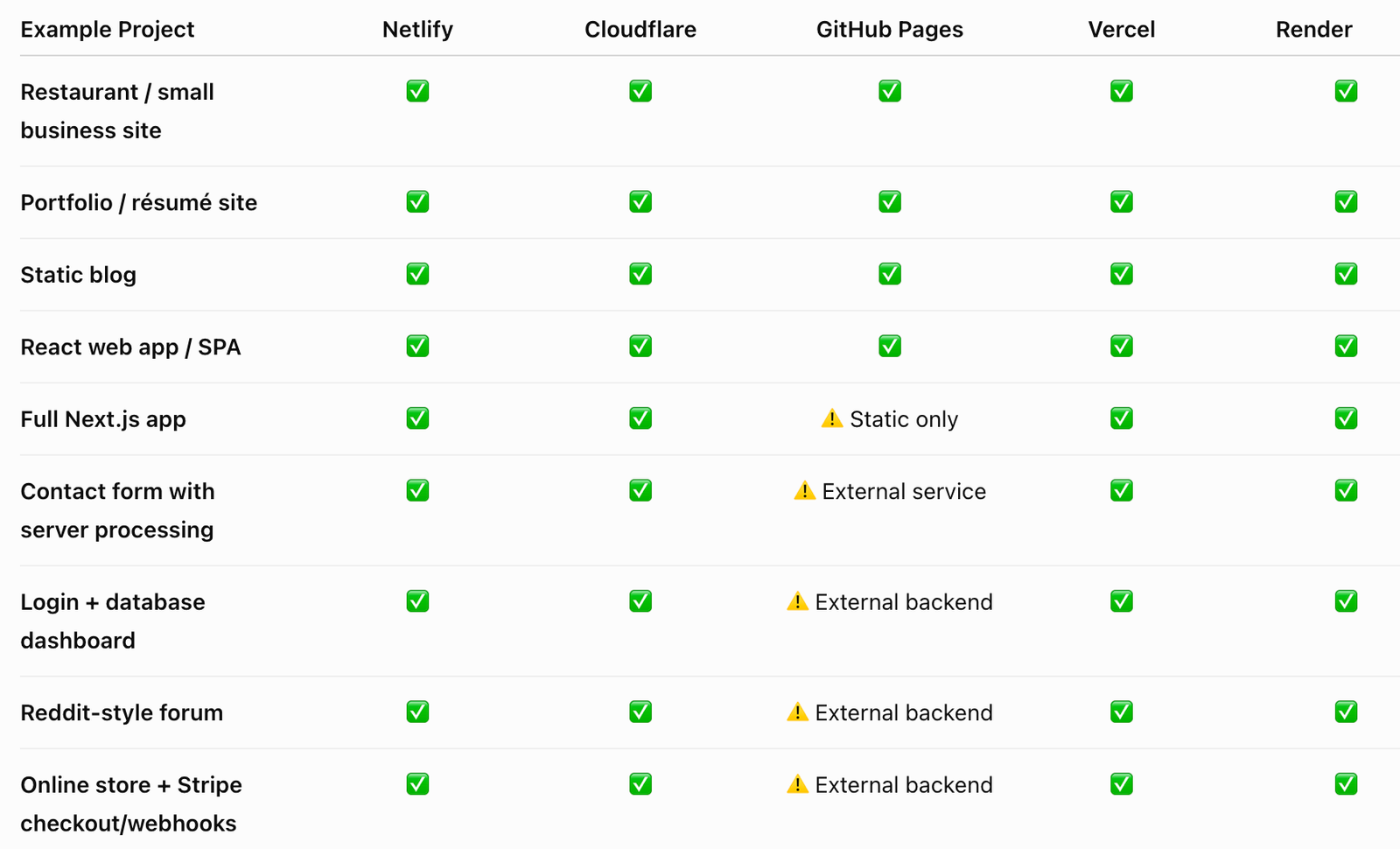
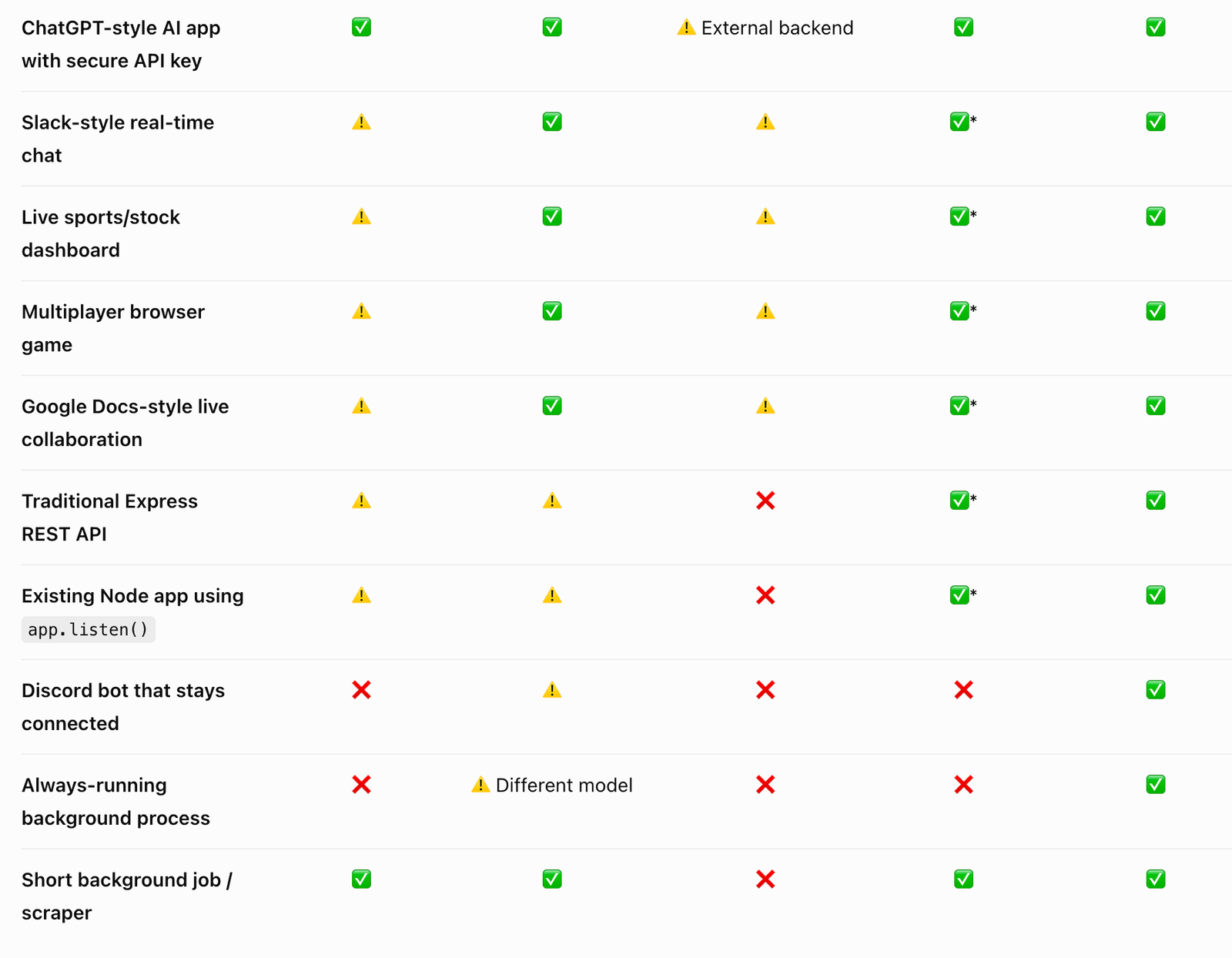
The biggest takeaway for me is that free web hosting has gotten really good. For a personal project or a small site that is just getting started, there is a good chance you can host it for $0, connect your own domain, get HTTPS, deploy updates easily, and even get some AI development help without paying for a traditional hosting account.