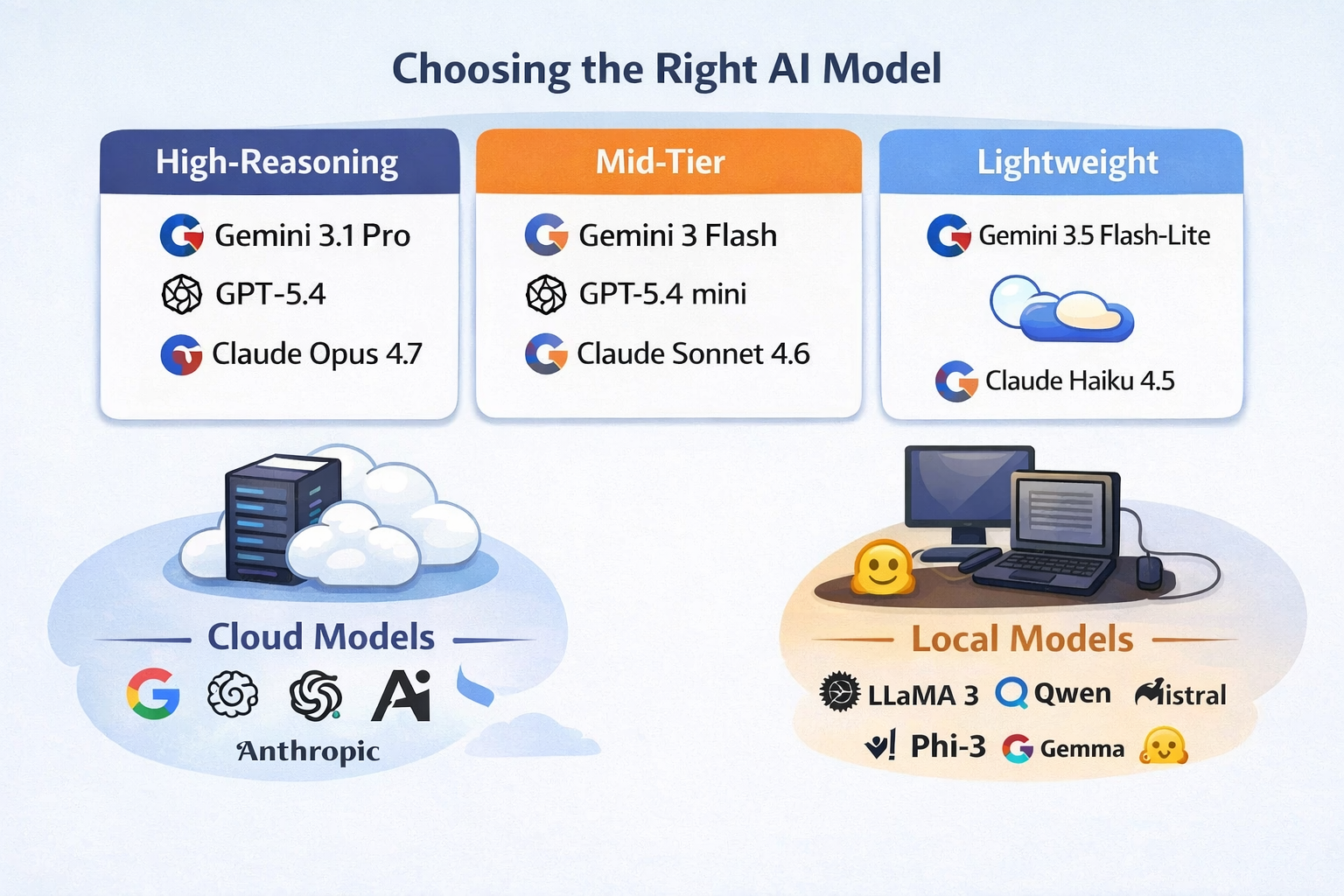
If you’ve been building with AI, you’ve probably noticed that the question isn’t “what’s the best model?” anymore. It’s “what’s the right model for this job?” The gap between models has widened, not just in intelligence, but in speed, cost, and usability. And once you start mixing cloud models with local ones, things get even more interesting.
Personally, I tend to gravitate toward the Gemini ecosystem, mostly because Google AI Studio makes it incredibly easy to get up and running. You can test, tweak, and deploy without much friction.
🧠 High-Reasoning Models (When accuracy matters)
When something needs to be right, this is where I go. These models are slower and more expensive, but they handle complex logic, multi-step reasoning, and troubleshooting much better than anything else.
-
Gemini 3.1 Pro
-
GPT-5.4
-
Claude Opus 4.7
Key takeaway:
-
Best for complex reasoning, debugging, and critical tasks
-
Pricing is highest here (you pay for thinking time + tokens)
-
Worth it when accuracy matters more than speed
⚖️ Mid-Tier Models (Where most real work happens)
This is the sweet spot. Fast enough to feel responsive, smart enough to be useful. If you’re building apps or doing daily AI work, you’ll spend most of your time here.
-
Gemini 3 Flash
-
Gemini 2.5 Flash (my personal favorite due to combination of price and performance)
-
GPT-5.4 mini
-
Claude Sonnet 4.6
Key takeaway:
-
Best balance of cost, speed, and intelligence
-
Typically 3–10x cheaper than top-tier models
-
Ideal for coding, iteration, and structured workflows
⚡ Fast / Lightweight Models (Speed over depth)
These are your “just get it done” models. They’re not going to solve complex reasoning problems, but they’re incredibly useful for summarization, search, and quick transformations.
-
Gemini 3.1 Flash-Lite
-
GPT-nano
Claude Haiku 4.5
-
Smaller local models via Ollama
Key takeaway:
-
Lowest cost tier (sometimes near free depending on usage)
-
Extremely fast and scalable
-
Great for pipelines and automation
🔎 Grounding, Search, and Real-World Data
One big shift that’s happening right now is grounding. This is giving models access to real-time information through search or external tools. Without grounding, models are just predicting based on training data. With it, they can actually look things up.
Built-in grounding (easiest setup):
-
-
-
Gemini 3.1 Pro / Gemini 3 Flash → Native Google Search grounding via API
-
GPT-5.4
-
Claude Opus 4.7
-
-
Tool-based grounding (more flexible, more work):
-
Llama 3.1 8B, Qwen 2.5 7B → Need to wire up your own search (Brave API works well)
Key takeaway:
-
Gemini, OpenAI and Claude = easiest “out of the box” grounding
-
Others = more flexible, but require setup
-
Local = fully customizable, but you build everything
🧩 The Best Open Source Models (8GB or less)
This is the category I think more people should pay attention to. If you have a decent laptop, you can actually run these locally without everything slowing to a crawl. They’re not perfect, but they’re very usable.
-
Llama 3.1 8B
-
Qwen 2.5 7B
-
Mistral 7B
-
Phi-3 Mini
-
Gemma 3 4B
Key takeaway:
-
Completely free to run (outside of your hardware)
-
Best for privacy and offline workflows
-
“Mid-tier adjacent,” but not full replacements
🔒 Privacy (Cloud vs Local)
This is something that gets overlooked.
When you use cloud models:
-
Your data is being sent to external servers
-
Most providers have strong policies, but it’s still leaving your environment
When you use local models:
-
Everything stays on your machine
-
No external calls unless you add them
Key takeaway:
-
Cloud = convenience + power
-
Local = control + privacy
-
For sensitive data, local models (or strict API configs) matter
💰 A Quick Note on Pricing
Pricing varies, but the pattern is consistent:
-
High-reasoning models → most expensive
-
Mid-tier models → affordable for daily use
-
Lightweight models → extremely cheap
-
Local models → free (but hardware-dependent)
The real trick is mixing them:
-
Don’t pay for a “Pro” model when Flash would work
-
Don’t use a local model for something it can’t handle
To give you a better feel for how much things cost here are a few examples and what they might cost:
searching the web for a recipe is usually pennies or less, and summarizing even a pretty large document is often just a few cents to a few dimes. The only time costs jump faster is when you use a higher-end model, very long documents, or grounded search that fires off multiple billable queries.
- Recipe lookup with Gemini 3.1 Pro: usually < 1 cent before search-query charges
- One Google Search grounding query adds about 1.4 cents
- Large-doc summary: often around 5–20 cents, depending on size
- The big wildcard with grounded search is how many search queries the model decides to run
- Asking a top model to write a basic Pong game is usually only a couple of cents for one good response, and still often under a dime or two even with a few follow-up fixes.
What about HuggingFace?
Hugging Face (https://huggingface.co/) fits into the picture as the flexible, open-model option. It can save money, especially for lightweight tasks or steady production workloads, and it gives you access to a huge range of open models. The tradeoff is that you usually have to do more of the assembly yourself. Gemini is more of a polished product. Hugging Face is more of a toolkit. If you just want an API that works with built-in grounding and strong multimodal support, Gemini is easier. If you want to experiment, control deployment, or run open models at lower cost, Hugging Face becomes very appealing.
Hugging Face does offer free access to some hosted model usage, which is great for testing and light experimentation, but you can hit usage limits and paid tiers pretty quickly if you build something people use regularly. If you want truly free use of open models, the best route is usually to run them locally.
🧠 Final Thought
The biggest shift is this: you shouldn’t be picking one model. You should be building a small stack. We’ve moved past the point where one model does everything well. The real advantage now comes from knowing which model to use, and when.